This review covers my transition from claw to fingertip grip with the ZeroMouse Blade and my experience using it as my daily driver for about two months.
English isn’t my first language, so please bear with me as I used a translator for some of the sentences.
I mainly used the Finalmouse Small and OP1 8K with a claw grip before @kANG_aims helped me try a zeromouse mod based on the Sora V2. I ended up liking the shape way more than I expected, which got me interested in trying a Blade printed shell before eventually buying the original zeromouse Blade.
SHELL
1. Size
The Blade has a wide overall profile similar to the Pulsar X2F, with more space between the contact surfaces for each finger than typical fingertip mice like the G-Wolves Fenrir series.
This allows you to position your fingers naturally, in much the same way you would on a conventional mouse.
By combining familiar finger placement with a fingertip-oriented design that eliminates the rear hump, the Blade gives you greater finger mobility and freedom of movement without significantly compromising your usual grip.
What stood out to me most was how little adjustment was needed when transitioning from a claw grip to a fingertip grip. Since I could largely maintain my existing finger positions and gripping habits, the transition felt almost completely natural, with virtually no sense of unfamiliarity.
As a result, I think the Blade can be a great fit for users who want to transition to a fingertip grip while retaining as much of their existing grip as possible. However, it may be more divisive among those who prefer a more direct, fingertip-driven feel when controlling their mouse. Since it sits wider in the hand than most conventional fingertip mice, I believe the Blade is better suited to preserving the familiarity of a claw grip than to providing the fine, fingertip-driven control some users are looking for.
2. Side Grip
I've always loved mice with flat sides, like a cliff that goes straight down, such as OP1, Finalmouse, and GPX.
The sides of the Blade are also relatively flat overall, but its side profile differs from that of a conventional mouse.
Take the G-Wolves LYCAN 8K and ENDGAMEGEAR OP1 8K as examples. Viewed from below, most mice have sides that taper inward toward the bottom, forming a \ / shape. The Blade has the opposite design, with its sides flaring outward toward the bottom, forming a / \ shape.
In my experience, the inward-tapering \ / profile found on mice like the LYCAN creates a more secure grip by allowing your fingers to hook into the recessed sides.
This gives the mouse a more locked-in feel, especially when lifting it off the pad.
The Blade, on the other hand, has sides that flare outward toward the bottom in a / \ shape. Rather than feeling firmly locked into my hand, it feels more like my fingers are simply resting on the sides.
Since there's less need to hook my fingers around the sides to keep the mouse secure, I have noticeably more freedom of movement, and making fine adjustments with my fingers while aiming feels easier.
However, this more relaxed grip does come with a drawback when lifting the mouse. Despite being a full 6 g lighter than the LYCAN, the Blade actually feels heavier when I lift it off the pad.
I suspect this is because my fingers can't secure the mouse as firmly, requiring more effort to lift it.
2-1. Left Side
The thumb grip surface was extremely comfortable. The shallow, gently recessed shape allowed my thumb to settle into a natural resting position, and I experienced no discomfort throughout use.
2-2. Right Side
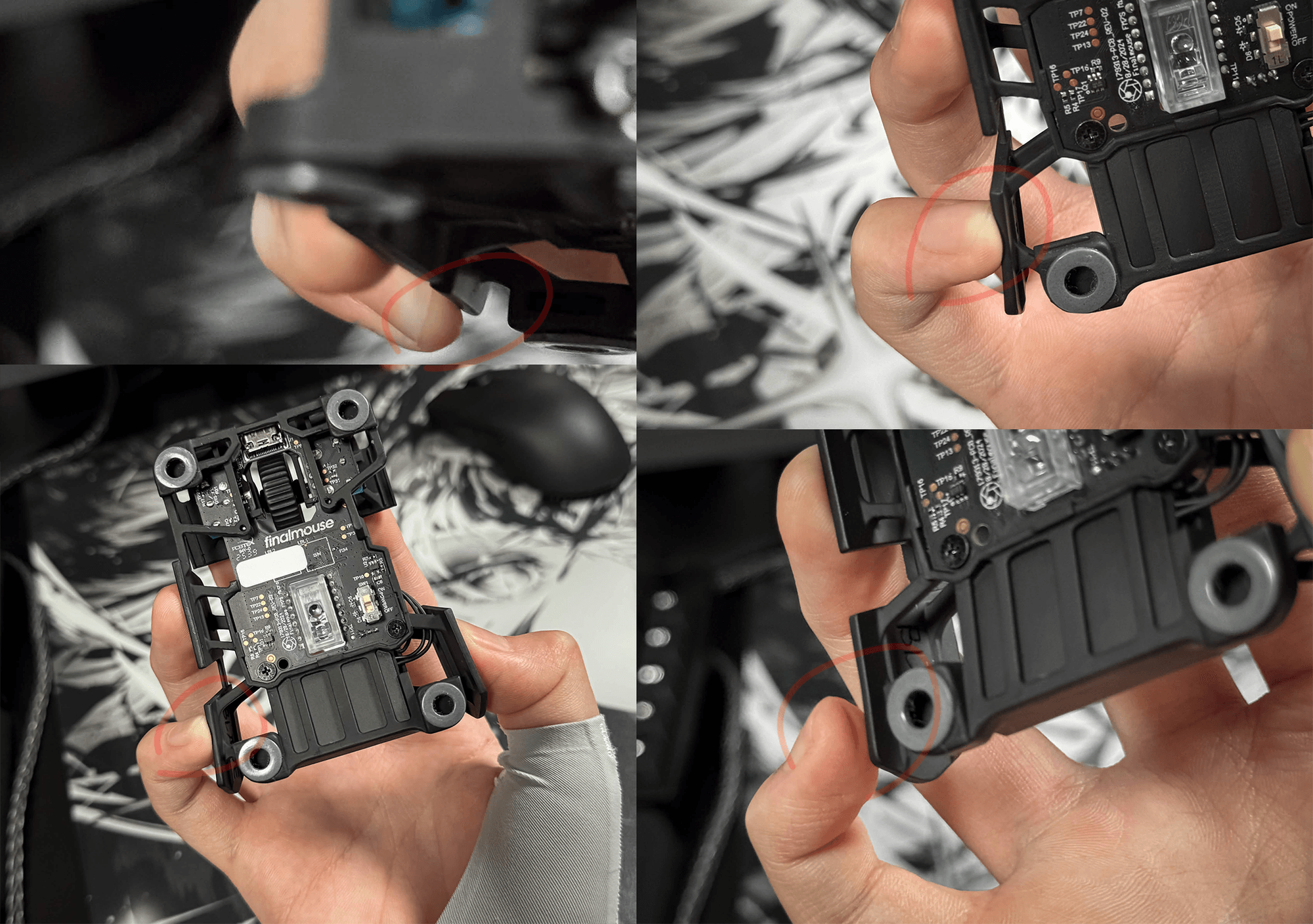
The Blade features shallow grooves on its finger contact surfaces. As shown in the photos, when viewed from the rear, the profile resembles the letter j. The upper section extends straight and flat, while the lower section curves slightly, with a sharply tapered edge.
With my grip on the Blade, my pinky ends up sitting below the recessed area on the right side, rather than on the intended contact point.
As a result, my pinky presses against the sharply tapered edge, causing considerable discomfort and pain.
That said, the shape should be very comfortable for users with a more conventional grip.
However, if you position your pinky lower on the side of the mouse like I do, this particular design may cause some discomfort.
2-3. Main Buttons
The main buttons have a U-shaped design with shallow grooves where the fingers rest. This helped keep my fingers from slipping around on the buttons and allowed me to maintain a comfortable grip.
One unusual design choice is that the right mouse button sits lower than the left, similar to what you'd find on an ergonomic mouse. While the asymmetry felt a little unusual at first, I had no issues with it in practice and was able to rest my fingers naturally on the buttons.
3. Clicks & Buttons
There's quite a bit to say about this.
First off, the actuation force is significantly higher than I expected. Both my previous Finalmouse and OP1 used the same Huano Blue Shell Pink Dot switches, yet the Blade had the heaviest clicks of the three by far.
Rather than feeling light and effortless, the clicks require a deliberate amount of force from my fingers to register. This quickly led to finger fatigue when playing clicking scenarios like 1wxts or playing Cassidy in ow.
I could also feel both the pre-travel and post-travel when clicking. After pressing the button, there was a small amount of movement before the click actuated, followed by additional travel until the button bottomed out.
As a result, the click didn't feel like one clean, continuous action. Instead, it felt like two distinct stages: first, the button had to be pressed with considerable force to actuate the click, and then it required further pressure until the button bottomed out.
This was somewhat distracting during actual gameplay as well. The bottom-out feel bothered me enough that I honestly wished the underside of the main buttons had some damping material to soften the impact and make the experience feel more consistent.
4. Skates
The Blade comes with Donut Skates included by default. Personally, I think they're an excellent choice. Compared to dot skates, their larger contact area helps prevent excessive friction and that overly stuck feeling on cloth pads, while still maintaining a fast glide.
However, when I removed the stock skates to replace them, I found that the holes were so large that fitting dot skates was difficult, if not impossible. As a result, I couldn't install the dot skates I wanted to use and had no choice but to stick with the Donut Skates.
Larger-diameter dot skates might fit, but the Xraypad Obsidian Pro Air Dot Skates I had on hand were simply incompatible.
I'm not sure why the holes needed to be so large that they effectively limit the options available to users who prefer dot skates. You can try attaching dot skates around the edges of the cutouts, but I found that this setup felt unstable and didn't provide a secure fit.
I have no complaints about the donut Skates themselves, but it's disappointing that users who prefer dot skates have such limited freedom when it comes to choosing their skates.
Coating
The coating on the mouse was also very impressive. With most 3D-printed modded mice, you can often feel the texture left behind by the printing process, but that wasn't the case with the Blade at all. The surface felt smooth and soft, to the point where it barely felt like a 3D-printed product.
I was particularly impressed by the fact that a coating had been applied to a 3D-printed mouse. It gave the overall build a much more premium feel and made the exterior look cleaner and more refined.
The coating felt similar to that of the Finalmouse Pro Series.
Build Quality
Honestly, it's hard to believe the Blade is 3D-printed. The mouse I previously printed using files from @kANG_aims felt flimsy and fragile, with the usual limitations in finish and structural integrity.
The Blade was a completely different story. As Optimum demonstrated in his video, it felt incredibly solid, with no concern about it breaking even under firm pressure.
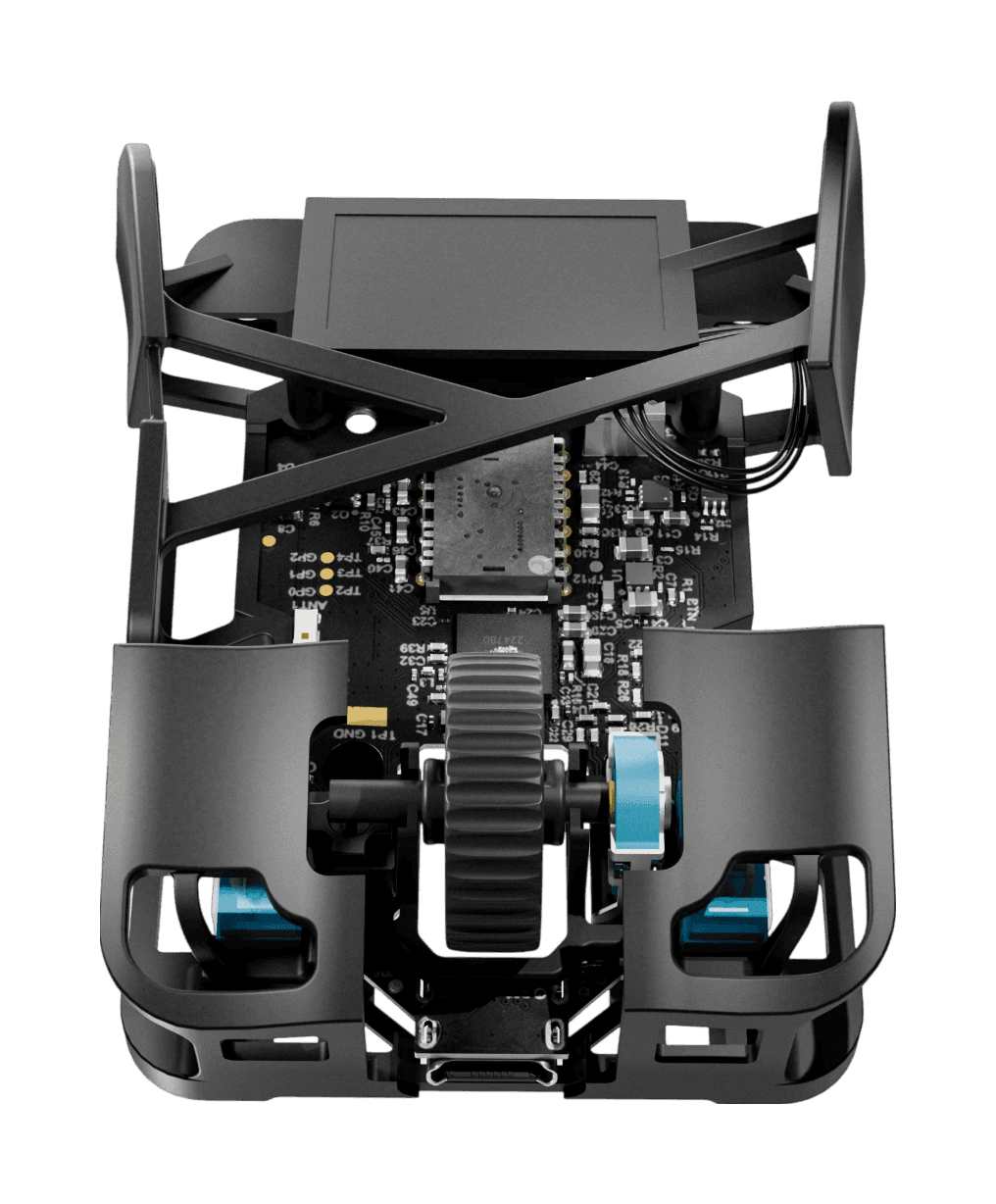
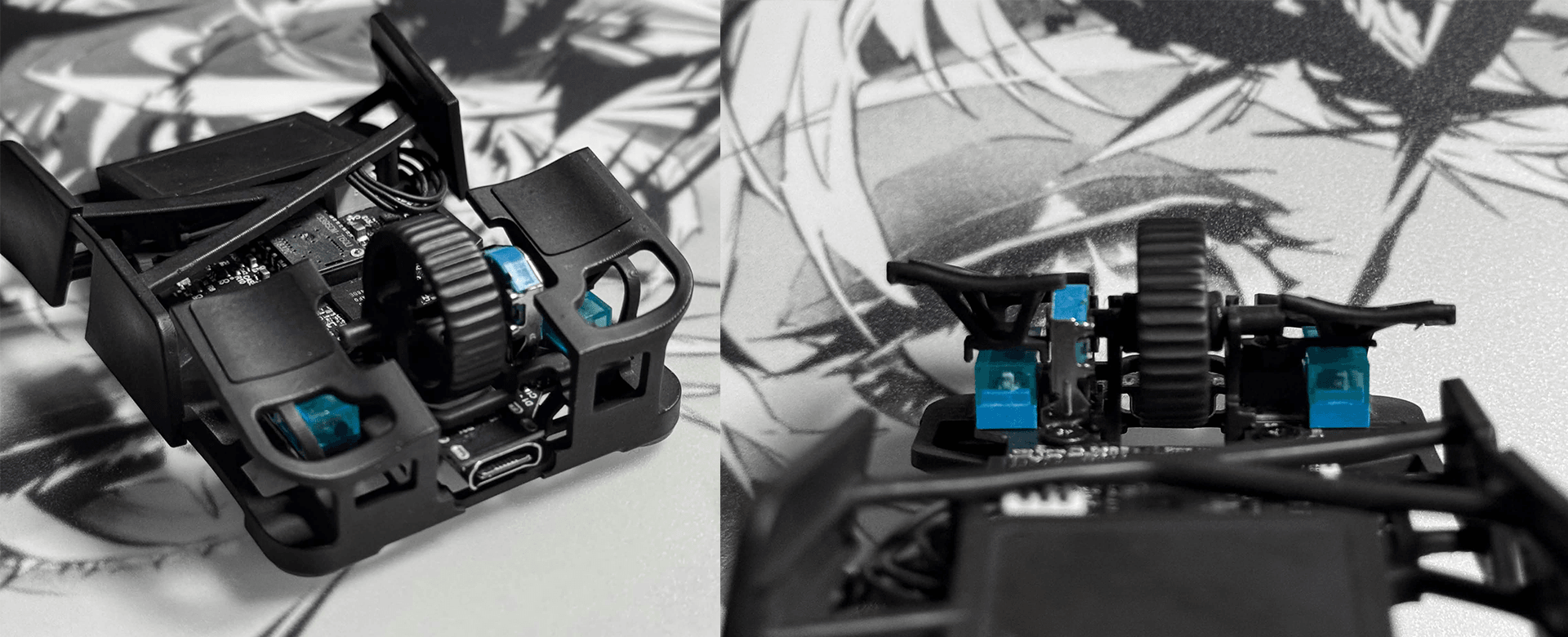
The internal build was just as impressive. The PCB and battery were securely mounted, with no risk of them shifting or coming loose during long aim sessions. The scroll wheel had zero lateral play and remained stable when scrolling or clicking.
Overall, the Blade's build quality and structural integrity far exceeded my expectations.
Overall Impressions
The Blade left me with a very positive overall impression, thanks to its clean build quality and its unique fingertip shell built around a Finalmouse PCB. What I appreciated most was how easily I could transition to a fingertip grip while retaining as much of the familiar grip I had with the OP1 as possible.
Since switching to the Blade recently, I've achieved several PBs across various Kovaaks scenarios, and I've also been very satisfied with my in-game performance. For anyone who's passionate about aiming and mice, I think the Blade is a shell worth experiencing at least once.
That said, the biggest hurdle is undoubtedly the price.
The biggest downside is the price. I paid $300 for my Blade on eBay, and the official price has now risen to a similar level. At this price, it's hard to recommend unless you specifically want the original developer-designed shell. If you're mainly interested in the shape and grip, the Pulsar X2F or community-made Sora V2 modding files offer more affordable alternatives.


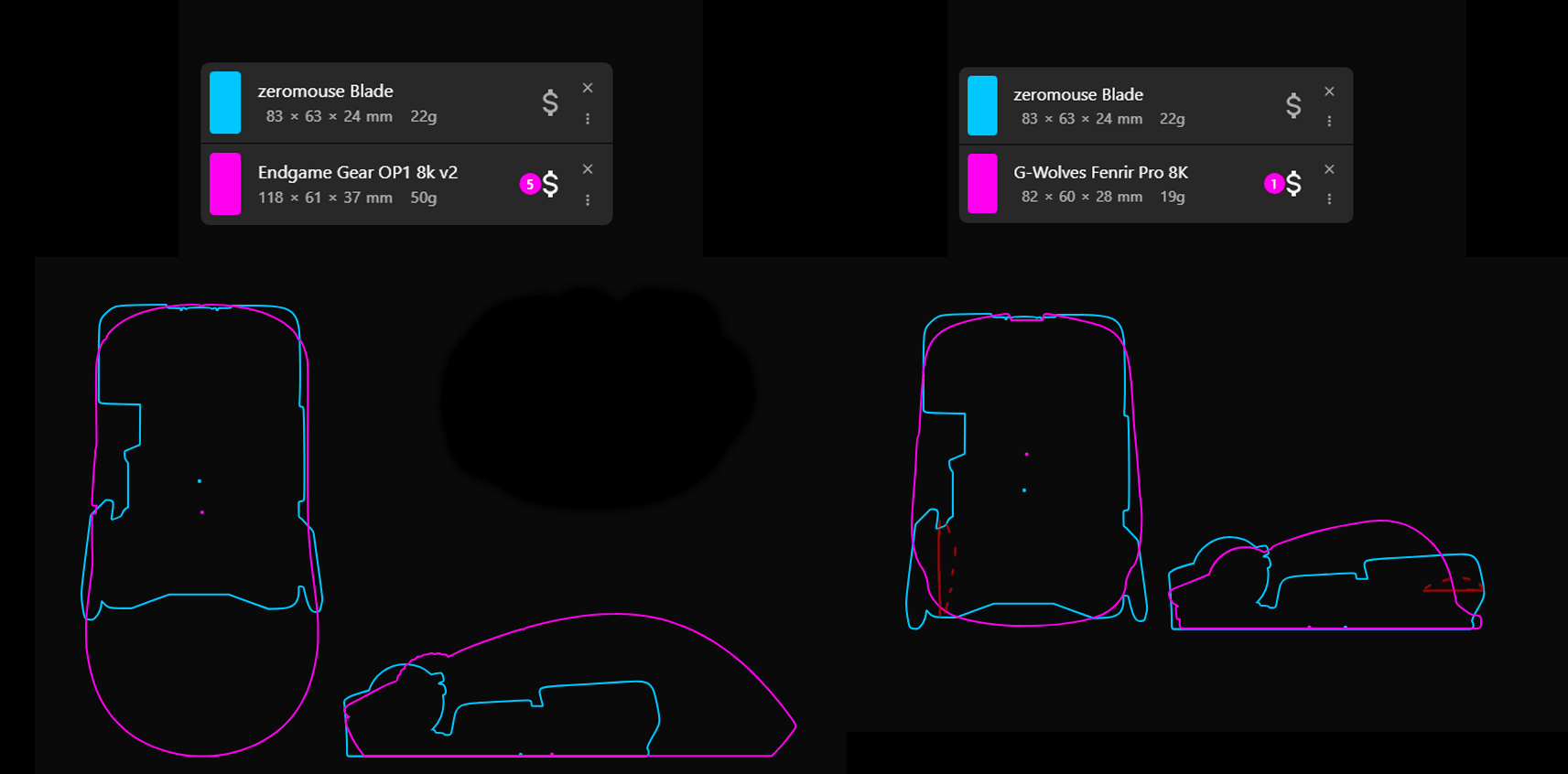 The Blade has a wide overall profile similar to the Pulsar X2F, with more space between the contact surfaces for each finger than typical fingertip mice like the G-Wolves Fenrir series.
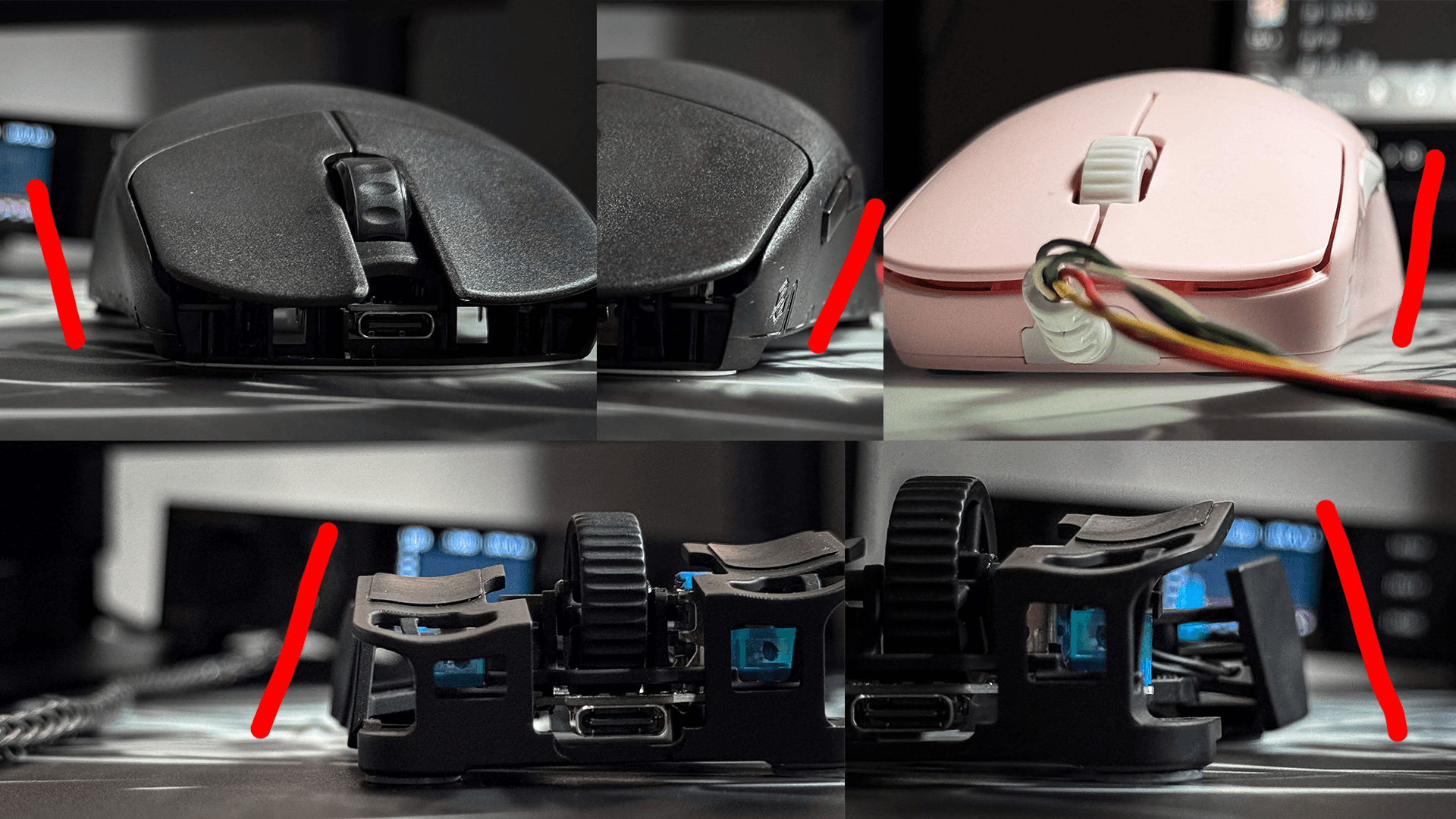 In my experience, the inward-tapering \ / profile found on mice like the LYCAN creates a more secure grip by allowing your fingers to hook into the recessed sides.
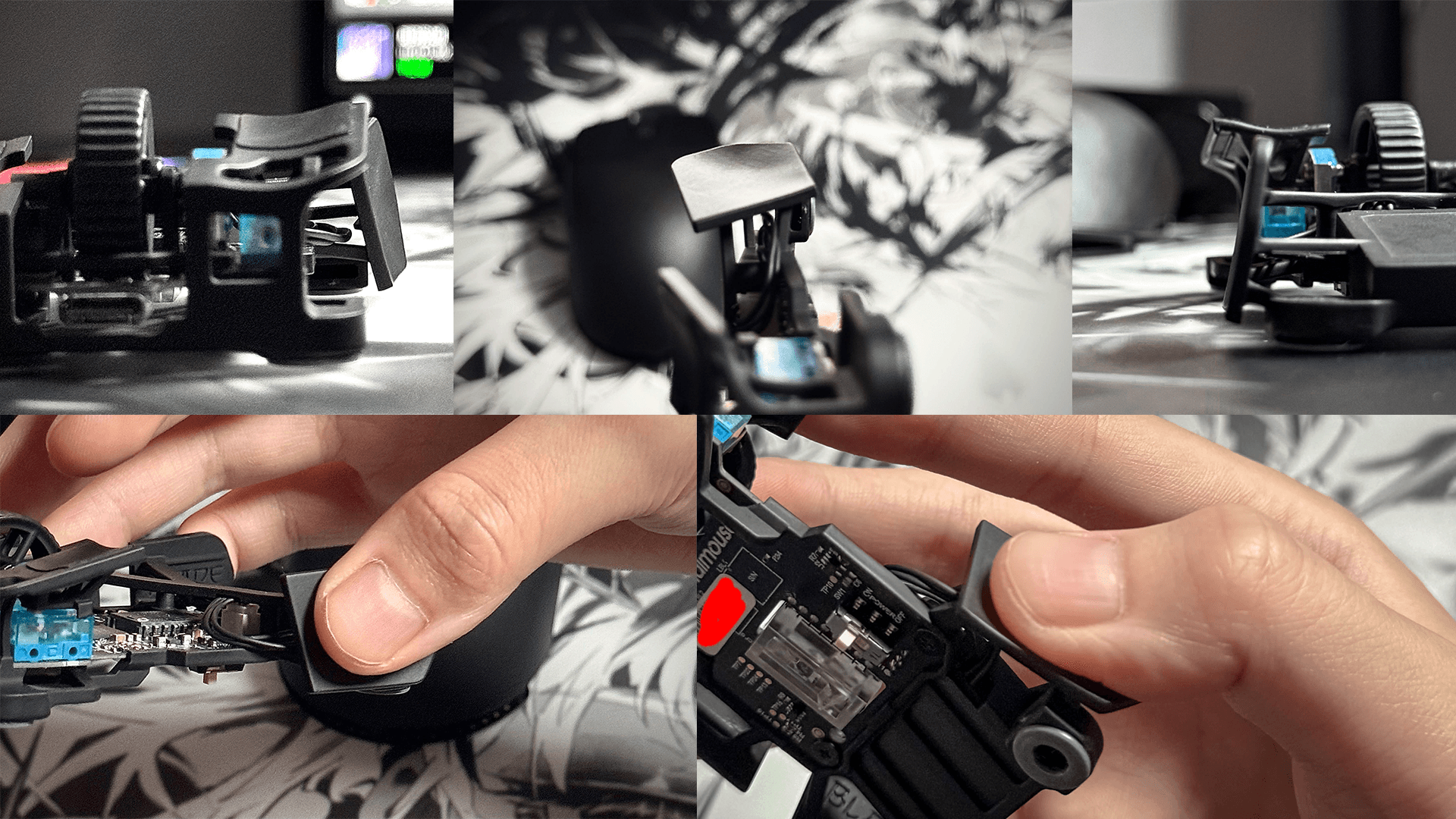 The thumb grip surface was extremely comfortable. The shallow, gently recessed shape allowed my thumb to settle into a natural resting position, and I experienced no discomfort throughout use.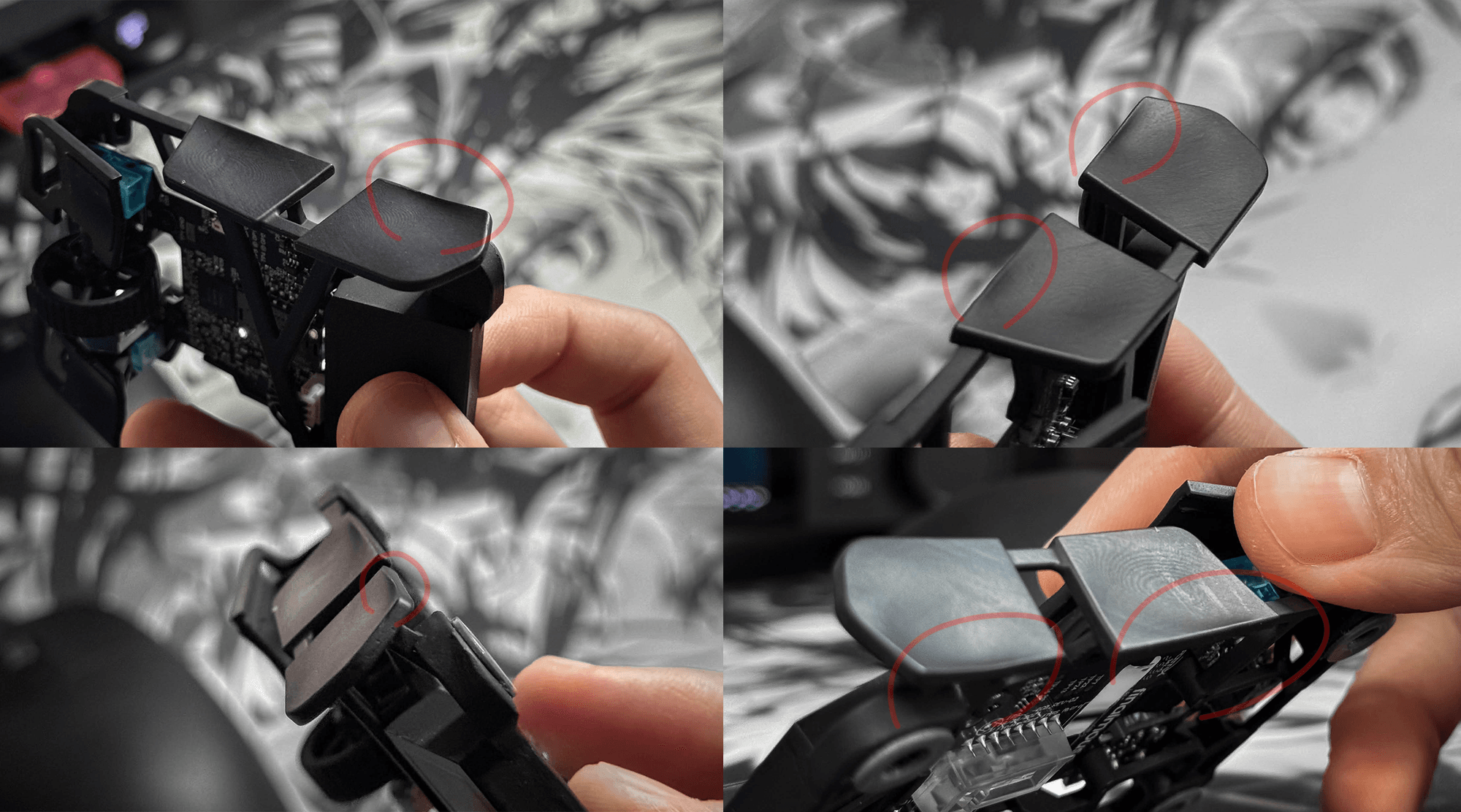
 The main buttons have a U-shaped design with shallow grooves where the fingers rest. This helped keep my fingers from slipping around on the buttons and allowed me to maintain a comfortable grip.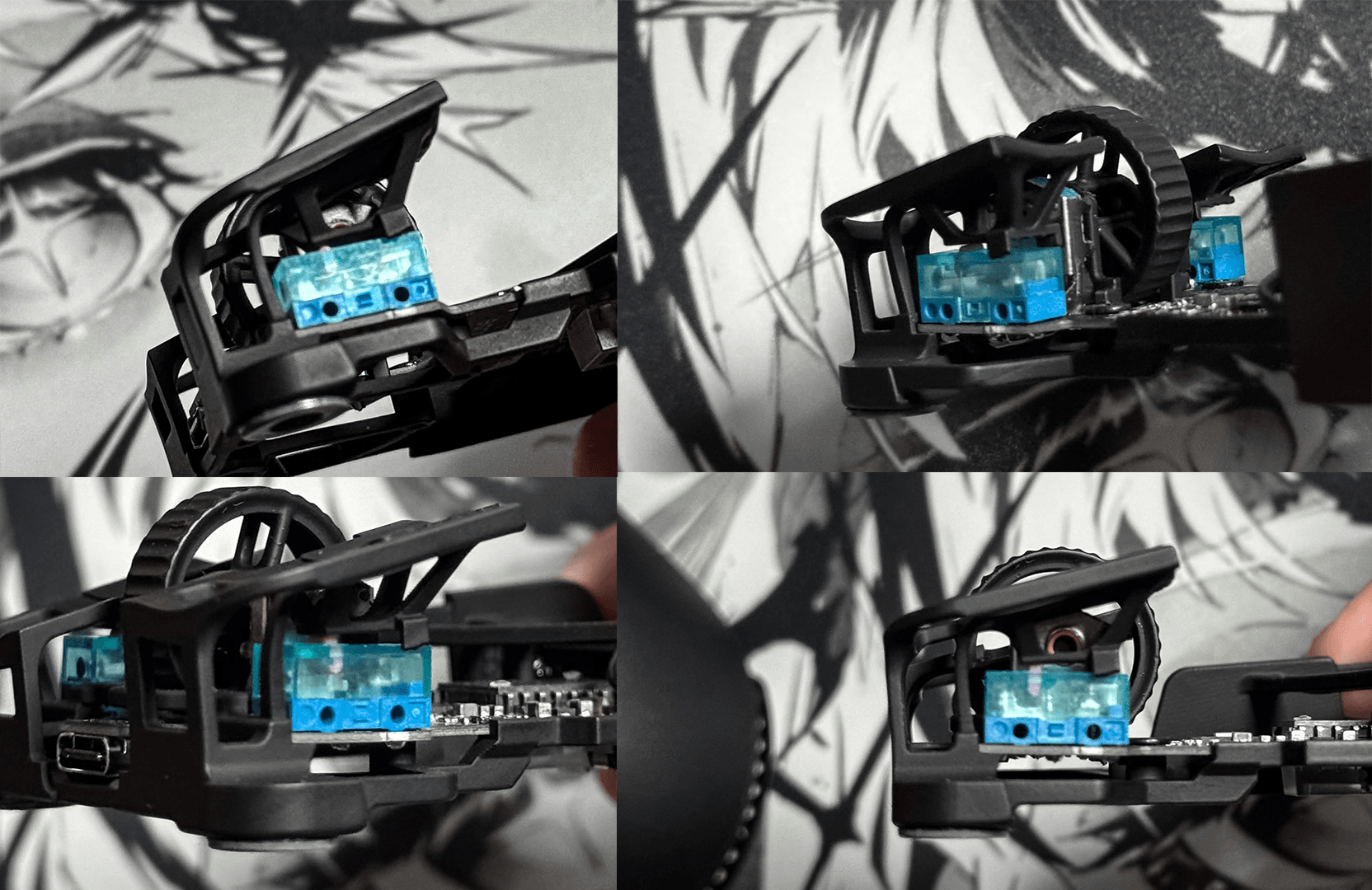
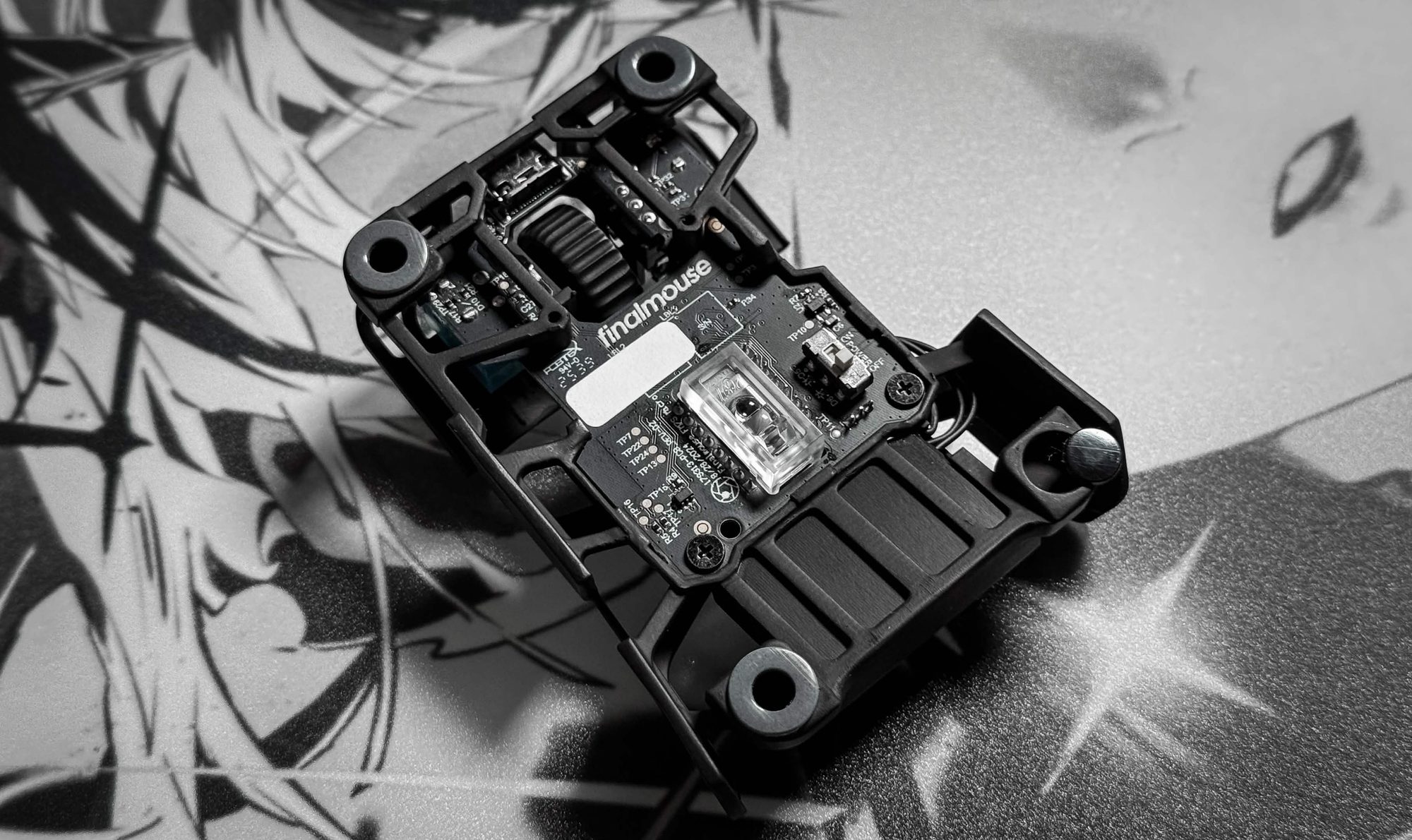 However, when I removed the stock skates to replace them, I found that the holes were so large that fitting dot skates was difficult, if not impossible. As a result, I couldn't install the dot skates I wanted to use and had no choice but to stick with the Donut Skates.
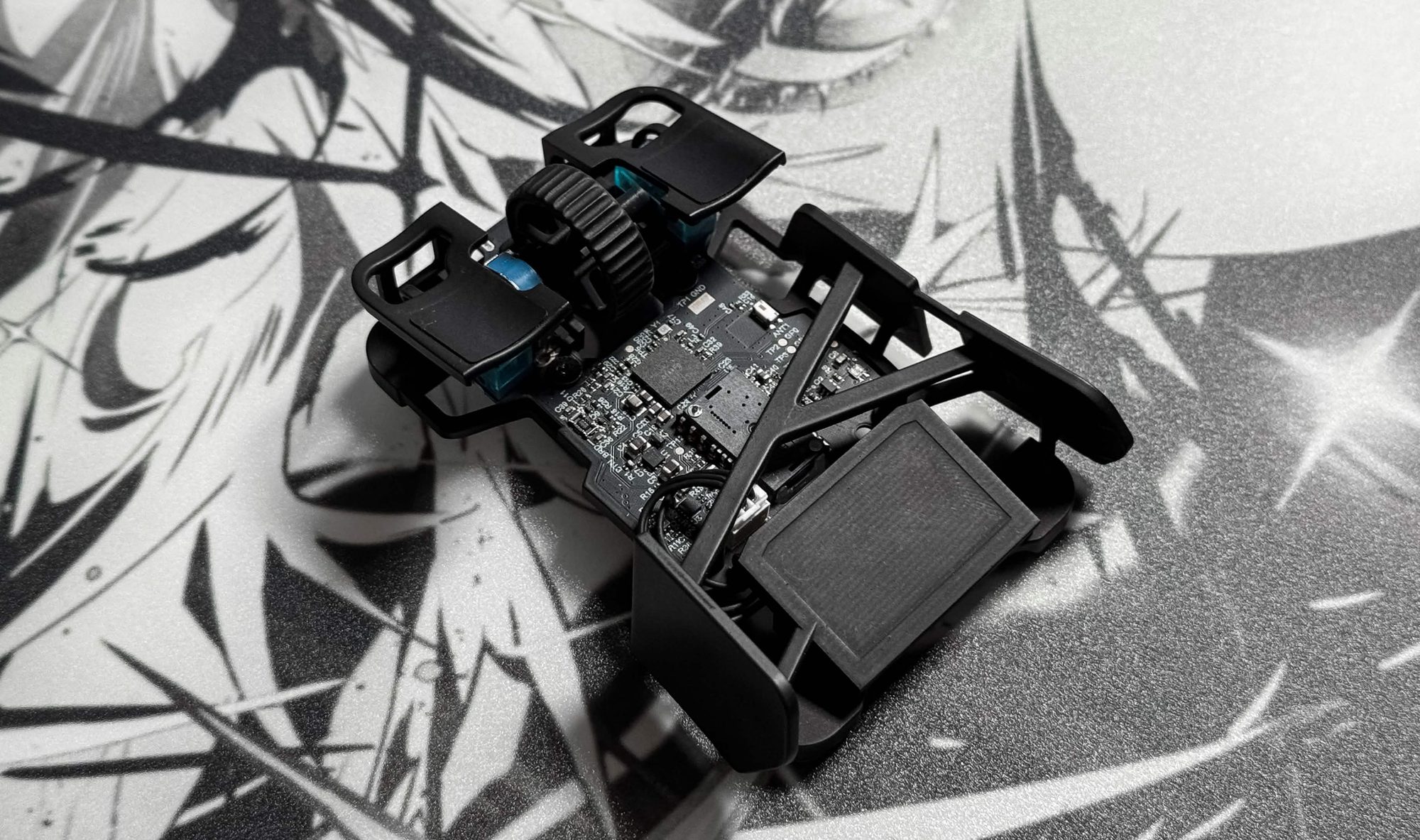 The coating on the mouse was also very impressive. With most 3D-printed modded mice, you can often feel the texture left behind by the printing process, but that wasn't the case with the Blade at all. The surface felt smooth and soft, to the point where it barely felt like a 3D-printed product.
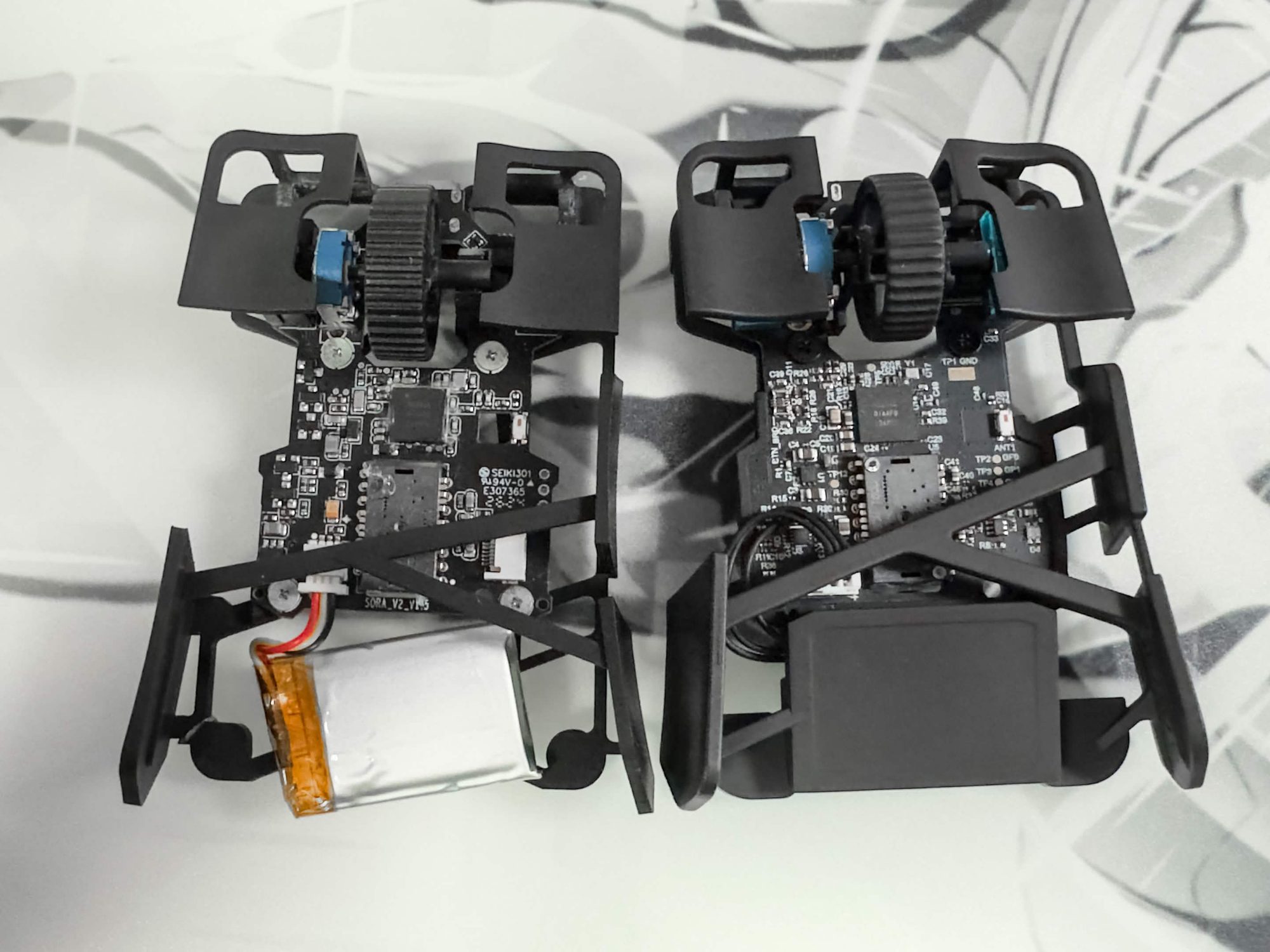 Honestly, it's hard to believe the Blade is 3D-printed. The mouse I previously printed using files from